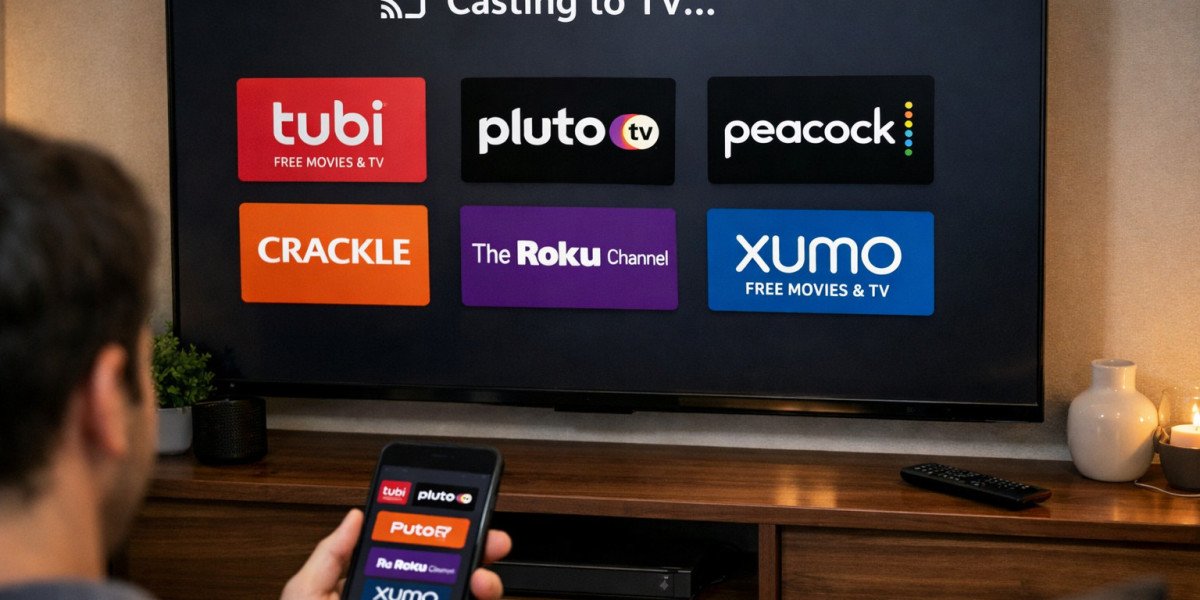
You found the perfect free streaming app. Tubi's catalog impresses you. Pluto TV's channels hook you. You've built a personal lineup costing zero dollars monthly. But now you face the ultimate test: getting that content from your phone to your actual television. Netflix made this effortless years ago. Their cast button appears universally, works reliably, delivers pristine quality. Can free alternatives match this experience?
The anxiety is understandable. You've accepted trade-offs accepting ads and older content. You don't want to sacrifice the big-screen experience too. The good news? Free streaming apps cast beautifully to televisions. Often, the process mirrors Netflix exactly. Sometimes, it works even better through native integration. Let me walk you through every method, every platform, and every workaround so your free streaming feels premium.
The Short Answer: Yes, Absolutely
Every major free streaming app supports television viewing. The methods vary slightly, but the capability exists universally.
Why Casting Matters for Free Streaming
Free apps thrive on mobile discovery. You browse during commutes, add titles to watchlists, sample content quickly. But serious viewing demands the living room: the comfortable couch, the sound system, the distraction-free environment. Casting bridges this gap. It transforms phone-based browsing into television-based consumption seamlessly. Without reliable casting, free streaming remains trapped in small-screen limitation.
The Technology Behind Screen Mirroring
Modern casting isn't magic, though it feels like it. Your phone and television communicate through shared WiFi networks. The phone sends instructions: "play this video file at this timestamp." The television fetches the stream directly from the internet, not from your phone. Your phone becomes a remote control while the TV handles heavy lifting. This architecture prevents battery drain and maintains quality. Free apps leverage identical infrastructure to paid services.
Google Chromecast: The Universal Standard
Chromecast technology dominates the casting landscape. Google built this into Android and convinced most app developers to adopt it.
How Chromecast Works with Free Apps
Look for the cast icon: a rectangle with WiFi waves in the corner. Tubi, Pluto TV, Peacock, Freevee, Plex, Crackle, virtually every legitimate free app includes this button. Tap it. Select your television or Chromecast device. The video transfers to your big screen within seconds. Your phone displays playback controls while the TV streams directly. The experience mirrors Netflix identically.
Setting Up Your First Cast
Ensure both devices share the same WiFi network. Open your free streaming app. Start any video. Locate the cast icon, usually top-right. Tap and select your target device. The first connection takes 10-15 seconds. Subsequent casts happen instantly. You can lock your phone, answer calls, or browse other apps without interrupting playback. The television maintains independent internet connection.
Troubleshooting Common Chromecast Issues
Casting fails sometimes. Usually, restarting the app resolves connection hiccups. Check that your phone and TV haven't connected to different network bands (2.4GHz vs. 5GHz). Update your free streaming app; older versions sometimes lose casting compatibility. Restart your router if multiple devices struggle. These steps solve 90% of casting problems without technical expertise.
Apple AirPlay: The Ecosystem Advantage
Apple users enjoy their own robust casting standard. Free apps increasingly support it.
Which Free Apps Support AirPlay
Tubi, Pluto TV, Peacock, and Plex all integrate AirPlay directly. The process mirrors Chromecast: tap the AirPlay icon, select your Apple TV or AirPlay-compatible television, watch instantly. Freevee and Crackle support AirPlay through screen mirroring if direct integration lags. The experience feels native because Apple controls both hardware and software standards tightly.
AirPlay vs. Screen Mirroring: Know the Difference
Direct AirPlay casting, like Chromecast, hands streaming duties to the television. Screen mirroring displays your entire phone screen on the TV. Mirroring drains battery, reduces quality slightly, and interrupts when notifications appear. Prefer direct casting when available. Reserve mirroring for apps lacking native support, understanding the quality trade-off.
Smart TV Native Apps: Skip the Middleman
Modern televisions eliminate casting necessity entirely through built-in app stores.
Tubi on Samsung, LG, and Sony
Tubi maintains native applications for every major smart TV platform. Navigate to your TV's app store. Search "Tubi." Install directly. Login syncs across devices through email or phone number. Now your television streams independently, no phone required. The interface adapts beautifully to remote control navigation. This often outperforms casting for dedicated viewing sessions.
Pluto TV Integration Across Brands
Pluto TV partners deeply with television manufacturers. Many Samsung and Vizio TVs include Pluto TV built into their channel guides, alongside traditional broadcast stations. You might already have access without knowing. Check your input sources or app menus. Native integration provides the most stable, highest-quality experience possible.
When Native Apps Beat Casting
Native apps offer advantages casting cannot match. They stream independently, freeing your phone completely. They often support higher resolutions, 4K on compatible televisions. They remember your place across sessions without phone synchronization. They receive updates optimizing performance for specific TV hardware. For households with primary viewing locations, native installation surpasses casting convenience.
Amazon Fire TV: The Contender
Amazon's streaming devices and televisions create their own ecosystem with unique advantages.
Freevee's Home Field Advantage
Freevee, being Amazon's service, integrates perfectly with Fire TV. It appears prominently in the home screen interface. Alexa voice control searches Freevee content naturally. The app launches faster, streams more reliably, and receives preferential treatment on Amazon hardware. If you own Fire TV devices, Freevee becomes your strongest free streaming option purely through ecosystem optimization.
Sideloading Other Free Apps
Amazon's app store carries Tubi, Pluto TV, and most competitors natively. For any missing services, Fire TV supports sideloading APK files. This requires enabling "Apps from Unknown Sources" in settings, then using downloader apps to install files. While possible, this introduces security considerations. Prefer official Amazon app store versions when available. The casting fallback, using your phone to cast to Fire TV, works universally without sideloading risks.
Roku: The Aggregator's Edge
Roku built its business on simplicity, and free streaming benefits enormously.
Roku Channel Built-In
Every Roku device includes The Roku Channel pre-installed. This aggregates free content from multiple sources into one destination. The Roku Channel itself offers substantial libraries. Additionally, it surfaces free content from partner apps you install. The universal search scans across free and paid sources simultaneously. For viewers wanting minimal complexity, Roku's aggregation reduces app-switching fatigue significantly.
Adding Third-Party Free Apps
Roku's channel store carries Tubi, Pluto TV, Peacock, Freevee, Crackle, Plex, and dozens more niche free services. Installation requires seconds. The interface standardizes navigation across all apps, reducing learning curves. Roku devices also support casting from phones through proprietary protocols, though native apps usually outperform this method.
Gaming Consoles: The Overlooked Option
Your PlayStation or Xbox probably streams free content better than you realize.
PlayStation and Xbox Free App Stores
Both consoles host full streaming app libraries. Tubi, Pluto TV, YouTube (with its free movie section), Plex, all install directly. The hardware handles streaming effortlessly, often outperforming dedicated streaming sticks in processing power. If you already own these consoles, additional streaming hardware becomes unnecessary.
Controller Navigation Tips
Game controllers work for streaming but feel clunky. Consider media remotes designed for consoles, or use companion phone apps that simulate touchpad control. The YouTube app on PlayStation supports phone pairing for seamless search and navigation. These refinements transform console streaming from tolerable to genuinely pleasant.
HDMI Connection: The Old Reliable
Wireless casting fails sometimes. Direct connection never does.
When Wireless Fails
Network congestion, incompatible devices, or stubborn apps resist casting. An HDMI cable solves everything. Most laptops output HDMI directly. Modern phones require adapters: USB-C to HDMI for Android, Lightning to HDMI for older iPhones. Connect physically, mirror your screen, stream anything. Quality remains perfect. Reliability becomes absolute. The cable clutter disappoints, but the functionality satisfies.
USB-C to HDMI for Mobile Devices
Android phones with USB-C ports often support DisplayPort alternate mode, enabling direct HDMI output without active adapters. Simple USB-C to HDMI cables cost under $15. This transforms your phone into a portable streaming box. Connect to any television, hotel room, friend's house, and access your entire free streaming library instantly. The setup takes seconds and works where WiFi casting fails.
Casting Quality: Free vs. Paid
You worry free streaming looks terrible on big screens. Reality surprises you.
Resolution and Buffering Realities
Tubi and Pluto TV stream up to 1080p on most content. Some newer titles hit 4K on compatible devices. Freevee matches Amazon Prime's technical quality. Peacock offers 4K for select content. The visual difference between these free services and Netflix becomes negligible on typical living room televisions. Ads interrupt occasionally, but the picture quality between ads rivals paid services completely.
Ad Delivery on Big Screens
Advertising on free streaming actually works better on televisions than phones. You see the full creative vision, not compressed mobile versions. Ad breaks feel like traditional commercial interruptions, familiar and tolerable. Some viewers prefer the structured breaks for bathroom trips or snack retrieval. The big-screen ad experience lacks the jarring intrusion of mobile pop-ups.
Multi-Room Setup Strategies
Free streaming enables whole-home entertainment without subscription multiplication.
Whole-Home Free Streaming
Install native apps on every television. Tubi on the living room Samsung. Pluto TV on the bedroom Roku. Plex on the basement console. Each room accesses the same free libraries independently. No account sharing complications. No simultaneous stream limits. No "too many devices" warnings. Free streaming's lack of restrictive account structures actually improves multi-room flexibility compared to Netflix's crackdowns.
Guest Access Without Account Sharing
Visitors want to stream their preferences. With Netflix, you face password sharing dilemmas. Free apps eliminate this entirely. Guests download Tubi or Pluto TV themselves, cast to your television, enjoy immediately. No credentials exchanged. No policy violations. The hospitality experience improves through simplicity.
The Mobile-First Problem
Some free apps resist television viewing intentionally or through oversight.
Why Some Free Apps Resist TV Viewing
Smaller free services sometimes launch mobile-only, prioritizing development resources. Others lack licensing agreements permitting big-screen display. Regional restrictions occasionally block casting for specific content. The "mobile-first" design philosophy ignores living room contexts. These limitations frustrate users expecting universal Netflix-like flexibility.
Workarounds That Actually Work
Screen mirroring solves most resistance. Enable developer options on Android for forced landscape orientation. Use browser versions of services rather than apps; desktop sites often cast more reliably. Third-party casting apps like Web Video Caster can stream content that official apps restrict. These workarounds require extra steps but rarely fail completely.
Future-Proofing Your Free Streaming Setup
Technology evolves. Your setup should adapt.
Emerging Standards to Watch
Matter and Thread protocols promise universal smart home integration, potentially simplifying casting further. Google and Amazon increasingly cooperate on casting standards. Smart TVs continue absorbing streaming stick functionality directly. The future points toward seamless interoperability regardless of app ownership or hardware brand.
When to Upgrade Your Hardware
If your television lacks HDMI ports or your phone cannot cast, upgrades become necessary. Otherwise, free streaming works beautifully on decade-old devices. Unlike gaming or professional applications, streaming demands minimal processing power. Your existing setup probably suffices. Spend money on content you love, not hardware you don't need.
Conclusion
Casting free streaming apps to your television works beautifully, often identically to Netflix APK. Chromecast and AirPlay integrate seamlessly. Native smart TV apps frequently outperform casting through superior optimization. Gaming consoles, streaming sticks, and even direct HDMI connections provide multiple pathways to big-screen viewing. The quality satisfies. The reliability surprises. The cost remains zero.
Your free streaming journey need not trap you on mobile screens. Tubi belongs on your wall-mounted television. Pluto TV deserves your sound system. The living room experience you associate with premium subscriptions translates completely to legitimate free alternatives. Setup requires minimal technical skill. Maintenance demands nothing. Enjoyment follows naturally.
The television industry spent decades convincing you that quality entertainment requires cable packages, then subscription stacking, then premium tiers. Free streaming apps, properly cast to your television, dismantle this mythology entirely. Your big screen awaits. Your wallet stays closed. The shows play on.
Frequently Asked Questions
Why does the cast icon sometimes disappear in free streaming apps?
The cast button requires active network detection of compatible devices. If your television sleeps, disconnects from WiFi, or experiences network issues, the icon hides temporarily. Ensure your TV remains powered and connected. Restarting the app forces fresh device detection. Some free apps also hide casting during ad playback, restoring controls when content resumes.
Can I cast free streaming apps to multiple TVs simultaneously?
Generally, no. Standard casting protocols transmit to single destinations. Multi-room audio systems like Sonos or Alexa groups sometimes synchronize audio across speakers, but video casting remains point-to-point. To watch on multiple screens, use separate devices or native app installations on each television. Free streaming's lack of account restrictions actually makes this easier than paid service limitations.
Do free streaming apps support 4K casting?
Selectively. Tubi offers 4K on compatible devices for specific titles. Freevee matches Amazon's 4K offerings where available. Peacock streams 4K for certain content. Pluto TV and most competitors max at 1080p currently. Your television, casting device, and internet speed must all support 4K for this to function. For most viewers, 1080p free streaming satisfies completely.
Will casting free apps use my phone's data or home internet?
Home internet. Casting instructs your television to stream directly from the internet, bypassing your phone's data connection entirely. Your phone consumes minimal data for control signals. This architecture prevents mobile data overages. However, if you use screen mirroring rather than native casting, your phone transmits video data, consuming significant bandwidth. Prefer native casting always.
Why do ads sometimes break casting connections?
Ad servers sometimes use different technical infrastructure than content servers. Your television maintains the content connection but loses the ad stream, causing drops. Free apps continuously improve this integration. If ads disrupt your casting frequently, try native TV app installation instead, which handles ad insertion more stably than phone-to-TV casting protocols.